

Chapter 6: Networks
This chapter covers:
Vulnerabilities
- threats in networks: wiretapping, modification, addressing
- wireless networks: interception, association, WEP (Wired Equivalent Privacy), WPA (Wifi Protected Access)
- denial of service (DoS) and distributed denial of service (DDoS)
Protections
- cryptography for networks: SSL (Secure Sockets Layer), IPsec, Virtual Private Networks (VPN)
- firewalls
- intrusion detection and protection systems (IDS and IPS)
- managing network security, security information, and event management
In this day and age, it is impossible to not interact with the outside world when using computers. Data and systems are stored in the cloud meaning you need internet to access these services. How do we ensure that what we do online is secure? We can ensure our own devices and data are secure within our own boundary, however connecting to points outside of that perimeter means you are at risk of exposing your activities to outside eyes. This chapter examines security in remote networks.
Browsers are the most common way to interact with the internet, and what type of browser you install and the services you access using it are under your control. However, there are situations where the browser can act against the user. Networks are something a user has little control over, and has much greater security risks.
We look at the potential threats and protections we can take against these threats. We start with a brief review of network concepts, and look at the four basic threat types.
Threats against networks fall into four basic categories:
- interception
- modification
- fabrication or insertion
- interruption
Here we see how these threats can be posed via Wifi hotspots and examine what security is available using these free access points to networks. Then, we move on to DoS attacks.
The book explains how to counter threats in networking using cryptography, firewalls and IDS & IPS systems. Then we examine what techniques and technologies we can use to manage network security.
6.1 Network concepts
A local network, or LAN, is a set of components. At home or in your office you will have computers, printers, storage devices, routers, TVs, phones, IoTs such as washing machines, cars, medical devices etc. Not forgetting the wires that connect all of these things together.
A cable is point to point, and has no leakage between the end points. This is because the cable simply runs between two or more devices, meaning the data is encapsulated and cannot be accessed by other means. However, there is a technique known as wiretapping which allows anyone with physical access to a cable to intercept the data that flows through it. This is usually done using monitoring devices. This can be prevented by storing cables in a secure environment.
Outside of physical premises however, it is impossible to control access to the physical wires that make up a remote network. These wires can be tampered with resulting in serious threats. Different types of cable have different vulnerabilities, for example, fibre optic cables are more secure than copper cables because they are harder to tap: copper cables emit electromagnetic signals that can be intercepted.[1]
A cable connecting a computer to a printer is easily understood: if you need to print a document, the data simply travels down the cable to the printer. But a single cable can be used for all types of data. How does the hardware differentiate between these data?
The data has a ‘mailing label’ which shows the sender and recipient. When sending data from one part of the world to another, devices along the network read this label to determine where the data is going. If the device is the intended recipient, it keeps the data. If not, it sends it along to the next logical destination. This is called routing. Computer programs perform routing, and these programs are susceptible to threats. Here we explore those threats.
Background: Network Transmission Media
When data leaves your computer and enters the network, others can view and intercept this data. Other words for interception: eavesdrop, wiretap, sniff. This can happen on both cable and wifi connections.
Signal interception is a serious potential network vulnerability.
p352
Cable
A LAN connector, also known as a network card or NIC, has a MAC address. This is a unique address and is included in the data sent and received by a device. A device will only take packets sent to its MAC address from the network.
Packet Sniffing
Packet sniffing is where a device retrieves all packets on the LAN. As above, a device is only supposed to retrieve packets sent to its MAC address, however NICs can be reprogrammed to have the same MAC address as another so it can intercept packets intended for the other device.
Radiation
Network cables emit radiation in the form of electromagnetic signals. Using inductance enables attackers to tap into a wire and read the signals running through it. Inductance can be blocked by other conductive materials: an attacker can corrupt data by wrapping a cable in wires and sending confounding signals which confuse the transmission. Despite needing monitoring hardware for wiretapping, these devices are cheap and easy to obtain, meaning this can be a serious threat. However, the attacker would have to have physical access to the wire to exploit this threat.
Sidebar 6-1 Electromagnetic Radiation
Electromagnetic leakage is a serious threat and attackers can potentially intercept all sorts of data by using electronic equipment. Wiretapping can be performed from a distance: tt is not just devices clamped to wires that we should be worried about. Even modern televisions can emit signals that can be read from 10 meters away, and keyboard signals can be intercepted from a distance of 5 to 8 metres.[2] It is not just keylogging software installed onto your computer that can read what you type!
Cable Splicing
An attacker can cut a cable which stops any data transmission. However, they can intercept by repairing the cable by splicing another cable to the original, which then receives all the same data. This does not have to be accomplished by severance: a small amount of the inner wire can be exposed, a cable connected to that, with the same objective.
Both severing the cable and attaching a secondary cable alter the impedance of the cable. The impedance represents the resistance of the cable, or the amount of electrical current passing through it. Impedance change is noticeable, however, it can be explained via social engineering: ie, the attacker pretending to be a network repair person and notifying the company that a change in impedance is expected.
An attack by cable splicing affects the network in the same way as plugging in another device – this can easily go unnoticed or be easily explained. An attacker, if they have access to the cables, may also have access to network points where they can simply plug in their device.
Interception through cables can also be achieved by locating the wiring panel and configuring the LAN topology, for instance adding a switch to re-route data. A sniffer can be used to connect to the network and intercept all traffic: this can be stored or forwarded on to another network.
Signals that are sent on a network are multiplexed, meaning multiple signals are combined so data can be transmitted quickly. Wiretapping on a LAN is easier than on a WAN as LAN sends separate packets: WANs have heavier traffic and it can be more difficult to decipher the signals. It can be done, however the desired data needs to be extracted from other unwanted signals.
Optical Fibre
Optical fibre sends data using light waves, not electricity, so wiretapping a fibre optic cable is fruitless. Optic fibre cables cannot be spliced either, as a damaged cable means no signals can be sent at all. If a new connection is made to a fibre optic network, the entire network needs to be configured to accommodate the new device.
Data can be intercepted via the junctions in a fibre optic system however: via repeaters, splices, taps, and device connections. Fibre is more secure than copper cable but is not impossible to penetrate.
Microwave
Now we move from cables to airwaves. Microwave signals are transmitted through the air and is a line-of-sight technology. This means the sender has to send its signals to the receiver without obstacles. The path of the signal is wide: a bit like a water hose on spray, it needs to have a wide angle of attack to ensure it hits the receiving transmitter. It is easy for someone to intercept these signals by placing an interceptor nearby, as in the diagram below. However, because microwave transmitters carry a lot of traffic, it can be difficult to intercept the desired data. Microwaves do not work in hilly terrain, and are also disadvantaged by the curvature of the earth. Transmitters need to be placed in locations where they can pick up the signals and pass them on, similar to primitive methods of communication like smoke signals or semaphore.

Satellite Communication
Satellites are man-made and sent into orbit to send and receive signals from earth. A ground station is a terminal on the earth’s surface that intercepts these signals; companies like Amazon Web Services offer a managed service that gives you control over satellite communications and data processing.[3]
Satellite transmission covers a very large area. Any ground station antenna can pick up signals sent from satellites, however signals are heavily multiplexed meaning the risk of any data being intercepted is small.

All network communications are potentially exposed to interception; thus, sensitive signals must be protected.
p365
Background: Protocol Layers
The OSI (Open System Interconnection) Model is a conceptual framework which describes how data is sent through a network, known as the backbone of computer networking.[4]
The Application, Presentation and Session layers are software.
Network, data link and physical are the hardware layers.
Transport layer is used to connect the software to the hardware layers.
The data is first prepared by the application layer, then sent down through the layers being converted to work with the relevant protocols. When the data reaches the physical layer it is ready to be sent along the cables or through the airwaves.
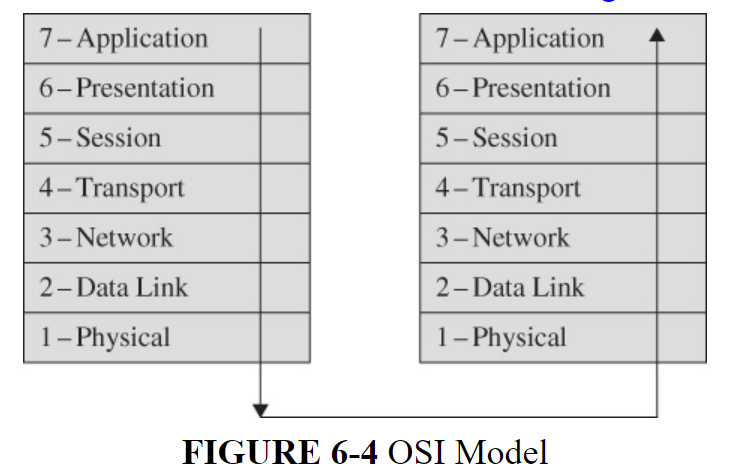
Data can be intercepted at any level: the application can leak data, the physical can be wiretapped, and a session can be hijacked.
Background: Addressing and Routing
For data to be received by another party, there needs to be a path between the sender and receiver for the data to follow. A direct connection can be used, for example if an organisation has two offices they can install a private connection between the two. This is not practical for everybody, so we use a network.
Protocols
When sending an email, we do not know what medium is used to transmit the data, whether it is a copper wire, fibre optic cable, satellite, or microwave. Usually it uses a combination of these things which makes it independent. Each layer has its own way of doing things and can only communicate with the layer above or below it.
The network is implemented by a protocol stack called the TCP/IP protocol stack; the OSI is the conceptual framework for the division of communication, whereas the TCP/IP physically implements the functions.
| Layer | Protocols used |
| Application | DNS, DHCP, SNTP, Telnet, FTP |
| Presentation | HTTP, SSH, SNMP, SMTP |
| Session | RPC, SCP, ASP, ZIP, NFCP |
| Transport | TCP, UDP, SCTP, DCCP |
| Network | IP, ICMP, RIP, OSPF, BGP |
| Data Link | Ethernet, P2P, ARP, MAC, Wifi (IEEE 802.11) |
| Physical | Ethernet, Token Ring, RS-232, USB, Bluetooth |

Addressing
How do all the devices know where to send an email? If you send an email to me, at hannahvclarke.co.uk, that is my ‘destination host’. The router, on the network layer, sends the message from your network to the network where hannahvclarke.co.uk is located. The network layer uses protocols to add two headers to the email, one stating the destination address and another the source. Many routers can be involved in amending these headers to route the email to the correct place.
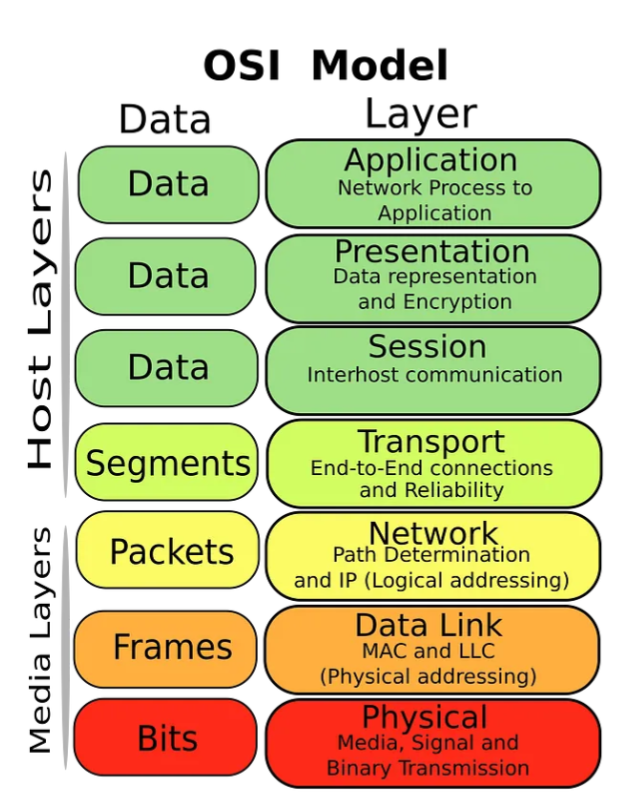
A packet is a data transmission with a destination address, source address, and message (the content). Packets are used on the network layer. A packet is the smallest possible unit of data transmission.
When the packet reaches the data-link layer, two more headers are added: the NIC address for your computer, and the NIC for your router. NIC (Network Interface Cards) are installed in every device connected to a network: it has a MAC address which is unique to that device, specified by the manufacturer. This is called a frame. When the data-link layer has transformed a packet into a frame, it puts it onto the network, and if it sees any frames on the network with its own NIC address, it takes these and processes them for the specified device.
NB: In layer 4, the transport layer, the data units are segments and datagrams.
MAC address: unique identifier of a network interface card that connects a computer and a network
p359
When the NIC card sees a frame with its address, it checks that the packets are really intended for the recipient device, then the layers do their work:
- The session layer reorders packets, as they may not arrive in sequence.
- The presentation layer removes compression and ensures the medium is appropriate for the application.
- The application layer formats and delivers the data in an appropriate format; ie, an email or PDF.
Each different layer has its own job to do, and this makes it easier for troubleshooting if something goes wrong.
Routing
Routers are used to send data from one NIC to another. The Internet is made up of many routers, and when your packet hits a router, the protocol is used to decide the quickest route to the destination NIC, using a routing table. It forwards on the packet to the NIC of the next router.
Routers are always working to update the table of the next logical NIC by communicating with each other; they talk about the connectivity status and traffic flow between devices.
Ports
When data arrives from a network, a port is allocated to receive that data. The data needs to be directed to an application that can process the data, for example, an email to Outlook. A service that is constantly ready to receive and pass on this data is called a daemon.
Ports usually follow a procotol that means they have already been allocated some service; port numbers 0 to 4095 are well-known ports, or system ports. IANA is responsible for port allocation.
Some examples are listed below:
| Port Number | Usage |
| 20 | File Transfer Protocol (FTP) Data Transfer |
| 21 | File Transfer Protocol (FTP) Command Control |
| 22 | Secure Shell (SSH) |
| 23 | Telnet – Remote login service, unencrypted text messages |
| 25 | Simple Mail Transfer Protocol (SMTP) E-mail Routing |
| 53 | Domain Name System (DNS) service |
| 80 | Hypertext Transfer Protocol (HTTP) used in World Wide Web |
| 110 | Post Office Protocol (POP3) used by e-mail clients to retrieve e-mail from a server |
| 119 | Network News Transfer Protocol (NNTP) |
| 123 | Network Time Protocol (NTP) |
| 143 | Internet Message Access Protocol (IMAP) Management of Digital Mail |
| 161 | Simple Network Management Protocol (SNMP) |
| 194 | Internet Relay Chat (IRC) |
| 443 | HTTP Secure (HTTPS) HTTP over TLS/SSL |
So, when an email arrives at an NIC, it is directed to port 110 so POP can transfer the data from the network into the email application.
Port: number associated with an application program that serves or monitors for a network service
p360
Part 1 – War On Networks: Network Security Attacks
Now we look at three types of security threats and vulnerabilities: wiretapping (interception), wireless networks and the loss of confidentiality, and halting the availability of data (interruption).
How do confidentiality and integrity failures happen in a network? Confidentiality can be breached by wiretapping, and loss of integrity when data is modified without authorisation.
On wireless networks, users have some control over them as they are much smaller compared to WANs. However, there can be little management or monitoring involved meaning it is the users’ responsibility to ensure data is kept secure.
Denial of Service attacks are when bad actors target devices to prevent authorised users accessing services. Connectivity is an integral part of networks, so access is expected: people pay for the privilege. Therefore serious harm can be caused using DoS attacks, and it is availability that suffers.
Keep note of controls and countermeasures that are alluded to within this section, though these will be explored in the next section.
Loss of integrity is categorised as a type of data corruption
p360
6.2 Threats To Network Communications
Remember the four primary types of harm that can be caused by security breaches:
- interception (unauthorised viewing)
- modification (unauthorised change)
- fabrication (unauthorised creation)
- interruption (preventing authorised access)
When we specifically talk about networks, the terminology changes slightly:
- interception = eavesdropping, wiretapping
- modification & fabrication = integrity failures
- interruption = denial of service
We will also look at a particular type of reconnaissance potential attackers engage in to find vulnerabilities: port scanning.
Interception: Eavesdropping and Wiretapping
Security analysts can only really control what is in their perimeter, or boundary. This includes any devices or cables that you have within your network and you are responsible for. Of course these devices will connect to the internet, but administrators do not have any control beyond the perimeter. It is important to ensure that you have secured the devices within your perimeter.

Wiretapping is a covert and unauthorised act where data is intercepted and can be achieved through various means. Wiretapping is an old term from when wires were physically ‘tapped’ to access the data on that wire. Now data can be transmitted via cables and airwaves, and can be intercepted in a variety of ways.
When data is transmitted through a network, especially a WAN, it can go via hostile regions and competitors, full of people wanting to access your data. These actors have three things that can make them into potential attackers: method, opportunity, and motive. Though many organisations think they could not be a target because who would want their data anyway?, not realising the value of the data they transmit.
To prevent bad actors getting hold of your data, encryption is used to prevent them being able to read it.
Physical security also plays a crucial part: this can be anything from locked doors and high fences to dedicated lines (ensuring only authorised parties have access), and controlled routing (where data always follows a specific path so it cannot be intercepted.
What Makes a Network Vulnerable to Interception?
Sat at home on your computer, you are unlikely to draw any attention to become a target. However, once you connect to a network, this is where risk increases dramatically.
Anonymity
If someone attacks your house, you know who they are: you have them on camera, you have eye-witness accounts, etc. An attack over the network is considered to be anonymous: anyone can masquerade as someone else online. A cracker can use other hosts to disguise themselves, and computers use different means to humans to authenticate users.
Sidebar 6-3 Unintended Intended Interception
Governments can request lawful interception from telecommunications, meaning authorised wiretaps can be installed within networks by the service providers: this can be done via software and hardware. Digital voice communications can also be intercepted in this way, not just emails and files.
Tom Cross, a security researcher for IBM identified vulnerabilities within Cisco routers meaning that a security flaw could be exploited by an attacker achieving unauthenticated access. Despite this being patched by Cisco, many routers were not updated. The Cisco hardware also does not track failed login attempts or notify administrators meaning brute force password cracking could go unnoticed, allowing crackers into the system.
Also, ISP employees could alert organisations that they are being lawfully monitored via wiretaps, and establish interceptions against a company without being discovered.
Cisco has not released their product designs to the public unlike other major manufacturers, hence security experts cannot be sure that their hardware is secure: although this is speculation by Cross, as there is as yet no evidence that Cisco devices have been breached in this way.
https://www.forbes.com/2010/02/03/hackers-networking-equipment-technology-security-cisco.html
Another company, Vodafone Greece was actually compromised in this manner using equipment manufactured by Ericsson. Their software code enables lawful interception, but deactivates the code for buyers who do not purchase that option, meaning they can monitor who enables interception; however Vodafone Greece did not obtain this, meaning interception could be activated by anyone, if they knew about it.
You can read more about this here: https://spectrum.ieee.org/the-athens-affair
Companies can sometimes think that ‘security through obscurity’ is an effective prevention of attack, thinking that because no-one knows about the flaw, it cannot be exploited. However, skilled hackers could find this flaw, effectively entering via a back-door they can use at will without fear of discovery.
Sidebar 6-4 Distributed Authentication Failures
Both people and processes need to be authenticated for effective security implementation. This authentication process is often distributed within a network: this is to ensure good performance and reliability.
Microsoft’s method of authentication for Windows NT 4.0 used a single primary domain controller, this was then rolled out to the other domain controllers on the distributed network. Because it used a single controller, this meant there was one point of failure, and a performance bottleneck as authentication could only be routed through this one controller.
For Windows 2000, this method was upgraded to a forest system or ‘forest functional level‘, which saw controllers as ‘trees’ – any tree could update the authentication database, but only one tree was granted permission to perform as a ‘master’ at a time. This master then rolled out changes to the other trees in the forest. This was an improvement for reliability and performance as there were backup masters rather than a single controller, but provided various points where hackers could access the system and modify the authentication database. These unauthorised changes would then roll out to all other controllers, resulting in the entire system being compromised.
https://www.techtarget.com/searchwindowsserver/definition/Active-Directory-functional-levels
Attacks can be attempted by external actors, and employees: the multimaster approach, or forest functional level, could be breached by a curious or malicious domain administrator who wished to access any Windows 2000 authentication database: this means data and services could be accessed, modified, or denied. This is why the least privileges principle and SoD is so important.
Many Points of Attack
Data stored remotely has to be transmitted across a network, meaning it can pass through several hosts to reach a subject. A large network can have hundreds of hosts, meaning a security breach in one can result in access to the entire network. A user relies on access control mechanisms within each one of these hosts, each being implemented by different administrators.
Sharing
These access control mechanisms can be complex, covering many devices and users. Again, the balance for security and convenience can be tilted in favour of simplicity, meaning rigorous security processes are not used to enable users to easily access data on a network. This can result in high potential for attacks.
System Complexity
Computers are complex. They can perform millions of operations per second, and the user is not aware of what it is actually doing. These background processes could be performing powerful penetrative attacks, and the user would not even know.
Most users have no idea of all the processes active in the background on their computers.
p366
Networks involve many different devices and operating systems: a Windows computer could be connected to a Linux computer, resulting in a complex operating system that has to work to make data compatible on both OS. This complexity makes securing the system more difficult.
Unknown Perimeter
We talked about the security perimeter earlier: a simple system can have a clear boundary. However, a host could be connected to two different networks, resulting in that boundary expanding by an unknown extent. Although one network may be known and secure, this second network could access the secure network through the single host. The diagram below displays the issues involved in having a secure boundary:
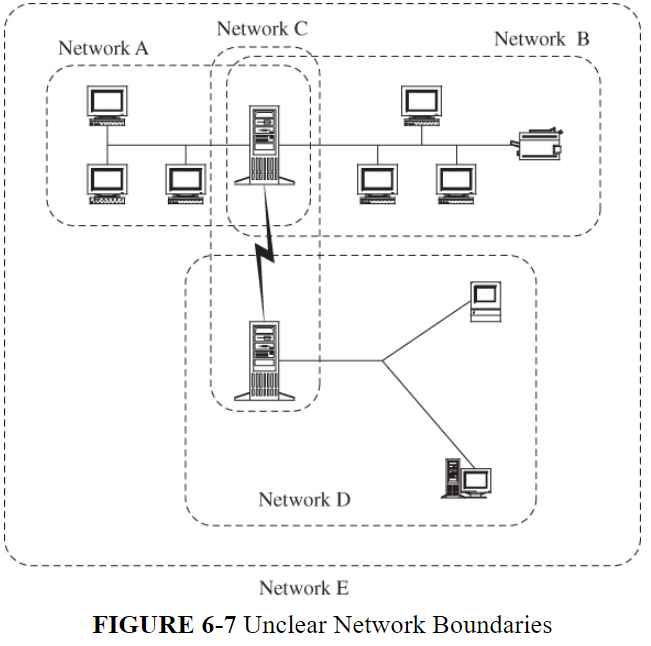
Unknown Path
Referring back to this unclear network, data that is routed through hosts could go through unsecured devices that offer potential vulnerabilities: network users, unless they have a specified path through secured routers, do not have control over how their data is routed.
As you can see from the diagram below, Host A1 wishes to send a message to Host B3. However, the message could be routed via unsecured hosts C or D via mobile phone signals, resulting in a flaw.

Sidebar 6-5 details one of these interception attacks.
Sidebar 6-5 Hello Can You Hear Me Now?
Mobile phones are always busy. With a traditional landline telephone, it is a simple cable connecting your phone to the local telephone exchange. This is a ‘simple’ conversion from audio to electronic signal.
A mobile phone:
- converts audio to electronic signal to make calls
- manages a connection to a mobile network
- when on the move, constantly looks for a strong signal
As mobile phone users, we don’t normally care how we are connected, as long as our phones are functioning as normal. This ignorance can be easily exploited by attackers, as Chris Paget demonstrated in his presentation involving a GSM tower, a laptop, and many unwitting mobile phone users.
Additionally, Nohl and Munaut managed to intercept calls using Motorola mobile phones as an interceptor. Using a table of encryption keys, they managed to find the keys to unencrypt a call and eavesdrop.
https://www.bbc.co.uk/news/technology-12094227
The lesson here is that networks significantly increase the risk of interception.
Modification, Fabrication: Data Corruption
Interception is a passive threat, meaning eavesdropping can result in theft of trade secrets or involved in espionage.
Data corruption results in data being tampered with during transmission, and involves three types:
- modification: modifying the data
- insertion: creating new data
- replay: repeating an existing transmission
Errors in data occur all the time: these can be simple errors made by users, or malicious. Sometimes data can deteriorate naturally as a result of connectivity issues, or unwanted ‘noise’. The diagram below shows potential sources of data corruption, however here we are interested in corruption via a network.

Data corruption can be intentional or unintentional, malicious or non-malicious, and directed or accidental. It can occur during data entry, in storage, during use and transmission, in transit, and on output and retrieval.
p368
Data corruption can occur naturally through signal failure (weather or natural occurrences, such as trees getting in the way of signals), or through malicious tampering. Both of these need to be controlled. TCP/IP protocols include error checking for transmissions. TCP/IP ensures that data is transmitted completely, correctly, and well-ordered.
Sequencing
Data is divided up into packets, which are sent via the network. Sometimes due to traffic, connectivity issues, or failures, packets are directed through different routes, and end up arriving at the recipient in a different order. TCP makes sure packets are delivered in sequence, however, attacks can result in packets being lost, or tampered with, resulting in them arriving in the wrong order.
Substitution
Substitution attacks are when one data stream is replaced with another. This can be particularly harmful in financial transactions, if an attacker gets hold of these packets and alters amounts or account details. The attacker would need to know which bytes represented what information, it would be relatively easy for them to substitute a new string in its place.
Encryption is the best defence against substitution attacks, which would make it difficult for the attacker to substitute bytes as explained above. Integrity checks can also be put in place, to make sure the sender can check they are performing the transaction as intended. Chaining is a process where each segment is encrypted, which means all the segments would need to be intercepted to modify the data; hard to do if each segment is routed via different hosts.
Sidebar 6-6 Substitute Donors
The NHS maintains a database of organ donors – it is possible for people to sign up to this register so on their death, specific organs the person has permitted can be harvested. This data is sourced from hospitals, doctors, and the DVLA.
The listing order for the organs was different from two of the sources, and this was handled correctly until 1999 when the software was upgraded, meaning the organs someone had allowed to be harvested on one source was different to the others, but they were all processed the same. This is examined in detail in a government report: https://assets.publishing.service.gov.uk/media/5a74ec42ed915d502d6cc16b/dh_120579.pdf
This is an example of an innocent mistake, however it demonstrates how easily substitution can occur if data sources are not collated.
Insertion
An insertion attack occurs when data values are inserted into a data stream – as long as they know where the data can go, it will be encrypted along with the rest of the message.
Replay
Replay can be used when an attacker wishes to send a single communication again without modifying or inserting any additional data: this can be useful for financial transactions, for example, a deposit of £100 into an attacker’s account can be replayed several times for monetary gain.
Replay attacks can also be used to login to systems, by resending the encrypted login credentials, as illustrated below. The attacker can then impersonate the real user without even knowing their login details.
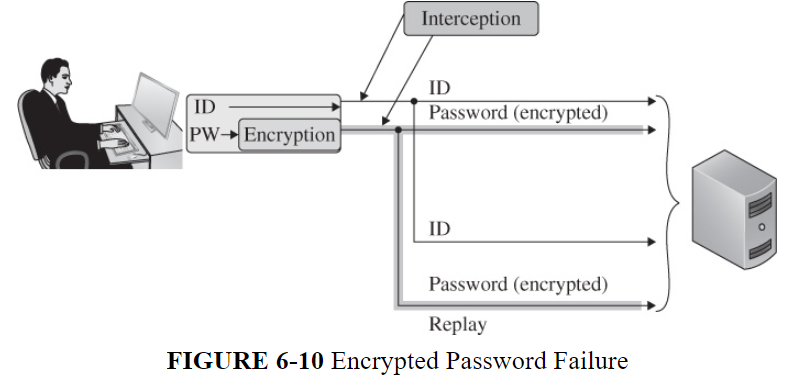
An attacker can intercept cookies in a replay attack to reuse a user session; if an attacker wished to login to a user’s email attack they can replay cookie to the email server which will then accept the cookie as valid authentication.
To prevent replay attacks, unique sequencing numbers are used. If the same number is replayed, the recipient knows it is not a valid transmission and can safely ignore the message.
Physical Replay
Replay attacks can occur in the real world as well as online. Attackers can crack CCTV systems and ‘replay’ access by authorised users when attempting to gain access themselves; the monitoring guards see the replay and assume the person requesting access is genuine, then unlocking the door for the attacker. Biometrics can also be exploited in this way, for example, a rubber fingerprint or even in extreme cases, a cut off finger!
Modification Attacks in General
Modification attacks affect the security concept of integrity: keeping data correct.
Integrity means data must be:
- precise
- accurate
- unmodified
- modified in acceptable ways
- modified by authorised people and processes
- consistent
- meaningful and usable
Ensuring integrity requires many defences such as internet protocols and encryption, monitoring, and techniques to safeguard against attacks.
Interruption: Loss of Service
Interruption involves availability: the ability of authorised users to access data or services. Networks need to be reliable, and redundancy and fault tolerance has been a feature since the early days of the Internet. Routers can use multiple paths to direct traffic, so if one fails, another one can perform in its place. However, the ‘last mile’, the path between a host and the network is a single pathway that has no recourse.
Loss of service can be malicious or non-malicious, and intentional and non-intentional. It is important to remember these terms; not every failing is a result of an attack. Denial of service is unlike the other two points in the CIA triad; an event can be placed on a scale of severity. If a cable is severed, total connection is lost. If a certain point has a bottleneck, data might be getting through but at a very slow rate. Both can be considered an interruption. Criticality also has to be considered, maybe a user is happy to wait for a slow download, but with transmissions like financial transactions or medical equipment, interruption can result in catastrophe.
Network design incorporates redundancy to counter hardware failures.
p373
Routing
Internet routing is complex, and routers rely on correct information to transmit data. For example, if a router goes down but still appears as online, data could still be routed there resulting in delays or loss of information. Routing protocols do have self-healing capacity however, and normally recover from bad data. Routing attacks are rare but not impossible.
Excessive Demand
Excessive demand results in network traffic slowing down or stopping completely. This is where Denial of Service attacks come in: attackers aim to overwhelm the system with too much data.
Component Failure
Hardware can fail – like a car, it can break down for various reasons. Many systems are in place to cope with redundancy, so if a device fails, others can take up its role. Induced hardware failure is a malicious attack, such as Stuxnet, detailed below, but usually components fail simply because they are old, badly maintained, or have some sort of manufacturing fault.
Sidebar 6-7 Stuxnet May Have Induced Hardware Failure
How can software damage hardware? The virus Stuxnet targeted devices’ power supplies, controlling the speed of the motor. If a motor is running at a high speed, this can destroy the equipment. The case of the Iranian nuclear enrichment facility, attacked by Stuxnet in June 2010, resulted in malware modifying the PLC (Programmable Logic Controllers) of the Siemens Simatic controllers, targeting drives running at high speeds that were for applications used for uranium enrichment. The centrifuges needed to run at a precise speed, and so speeding up the motors resulted in the quality of the uranium being much reduced.
https://symantec-enterprise-blogs.security.com/threat-intelligence/stuxnet-dossier-espionage
Port Scanning
Now we look at port scanning, a way for attackers to perform reconnaissance. This is how attackers ‘case’ a system, looking for vulnerabilities and opportunities. A port scanner looks at devices on a particular IP address, and reports which ports are vulnerable to attacks.
Ports are logical connections used by services for data to enter and exit your computer. In total, there are 65535 ports available to use. There are three categories of ports:
- system/well-known ports: 0-1023
- user/registered ports: 1024-49151
- dynamic/private ports (used on client hosts, so your own computer) : 49152-65535
A port scan maps the topology and hardware and software components of a network segment.
p375
Port Scanning Tools
Anyone can download a port scanning tool that can analyse a network and show open ports, what services each port supports, and the user of the daemon that provides this service.
Available tools are as follows:
- Nmap and netcat, both open source
- Nessus, CyberCop Scanner, Secure Scanner, and Internet Scanner, all paid-for services
Port Scanning Results
An attacker can learn four things from port scanning: which ports and services are running on a system, what OS is installed, what applications and their versions are installed, and how a network is set up: how many computers and routers for example. The attacker can then use this information to customise an attack on a system; attackers want to get it right first time. If carry out a sequence of failed attempts, these could be detected and their anonymity and opportunity lost.
Nmap specifically can give an attacker a lot of information:
- how many hosts
- IP and MAC addresses
- hardware brands
- OS and versions
- responsive ports
- responsive applications, their program and version
- response time, giving information on the network design
Harm From Port Scanning
The more information an attacker can get from your network, the more likely they can put together a harmful attack. Knowing the vulnerabilities in your system can provide access, for example, old software that hasn’t been patched, or open ports that can be easily exploited.
Port scanners are legitimate tools network administrators use to show information that will help them make the system more secure, or document and monitor devices connected to the system, and they are constantly improved to make this task easier. However, it also makes life easier for bad actors as well.
Network and vulnerability scanners can be used positively for management and administration and negatively for attack planning.
p379
Vulnerability Summary
All these attacks can lead to interception, modification, and denial of service, resulting in the CIA triad being compromised. As a security professional, it is best to stay aware of these attacks to enable you to take preventative measures and resolve incidents that do occur.
Attackers usually go for networks; there are more targets to choose from, and due to their complexity and size usually have some form of vulnerability that can be exploited.
6.3 Wireless Network Security
There are two approaches for securing wifi networks: the first, WEP (Wired Equivalent Privacy) is notorious as a security failure. The second, WPA (WiFi Protected Access) has security limitations.
Studying WEP is useful as it helps us understand the vulnerabilities in WiFi, and how integrating security for an already existing technology is difficult.
First we cover how WiFi works, and then explore the standards and their flaws.
Wifi Background
Wifi uses radio signals to broadcast information, and so these signals can be intercepted by anyone with a correctly configured in range antenna. So, the data is protected by ensuring the remote computer is properly authenticated when connecting to the access point.
Wireless communication will never be as secure as wired, because the exposed signal is more vulnerable.
p380
Sidebar 6-8 Wireless Interceptions
In 2002, a flaw was discovered in Telecom’s mobile email service. When one user logged off from their session, the WAP (Wireless Applications Protocol) kept the session open for a whole minute, meaning other users logging on and connecting to the same port within those 60 seconds would see the previous user’s message. Telecom blamed djuice, the company that provided the WAP technology, for the issue.
The book states that anyone can easily access wifi systems, many of which are advertised services especially in coffee shops. However, being able to access the Pentagon’s wifi, as Chris O’Ferrell managed to do, is a huge security flaw. https://www.computerworld.com/article/1326855/dod-it-projects-come-under-fire.html
BestBuy had to take their wireless tills offline after a customer managed to connect to their wireless LAN network: https://www.computerworld.com/article/1326573/retailers-defend-low-level-of-security-on-wireless-lans.html
Wireless Communication
Data communication is achieved using protocols: also described as a pattern, or convention: a way of doing things that all involved parties understand, and perform to achieve an objective. Not dissimilar to an algorithm, however the protocol is rules to follow, whereas an algorithm is a set of instructions for a computer.
- The book details the protocol in making a telephone call:
- Call your friend by locating number in Phone Book or inputting number
- Your friend hears the phone ringing and answers it, stating ‘hello’
- You return the greeting, and the conversation begins.
There are several places where things could go wrong: an incorrect number could be dialled, your friend doesn’t answer the phone, they answer but don’t speak, you don’t return the greeting, or just hang up. Just like with protocols, if the steps are not followed correctly, the objective of a telephone conversation cannot be achieved.
Protocols are agreed on internationally – everybody decides how computers speak to each other, and hardware and software are manufactured with this in mind. The protocol that describes how wifi works is called the 802.11 suite, or stack, of protocols.
The 802.11 Protocol Suite
The 802.11 Protocol describes how wifi works, watch the video below for a detailed explanation:
Wireless networks use Access Points instead of cabled connections, and devices need to connect to these Access Points to access the network. You can have as many APs as your network needs, however too many can cause problems such as connectivity issues. Cross-talk occurs when two signals overlap and interfere with each other, this can be avoided by having different users on different channels.

A NIC identifies itself (and hence its connected computer) by a supposedly unique MAC address.
p383
WiFi Access Range
When setting up a wireless network, distance needs to be taken into account. Wifi signals can only travel so far, and can be interrupted by obstacles such as walls. Outdoor signals can travel much farther than indoor because of the lack of obstacles. Antennas can be tuned to receive wifi signals on a certain frequency.
Sidebar 6-9 Using MAC Address for Authentication (Don’t!)
An alleged prank from Harvard University involved an announcement that students would no longer need to login using their university credentials and instead the network would authenticate users using their MAC address. This is a bad idea because it is easy to change the MAC address of a device: although MAC addresses are unique to each device, if you were able to access the Harvard network you could sniff some other user’s computer MAC, change the MAC address of your own computer, and access the network simply by matching the MAC address to entries contained within the authentication database.
The book has a link to a PDF detailing the event, but this has since been removed from the internet.
Sidebar 6-10 Google’s Street View Project
Google got into a lot of trouble during their collection of Street View data, as their cars were equipped with scanners to receive signals from wifi networks. This was part of another project to map wifi connectivity, however, they managed to collect a lot of data that was ruled to be private, including emails, passwords, device MACs an SSIDs. The intention was to deliver targeted advertising to certain locations using the data. The project ran from 2007 to 2010, and they were sued for millions, and had to pay fines to the government.
It is argued that Google simply collected data that anyone could have picked up: like being caught in a video or photograph, airwaves are natural occurrences that if recorded can reveal personal details. However, we expect our internet usage to be private, and assume the measures put in place by manufacturers and service providers to be adequate.
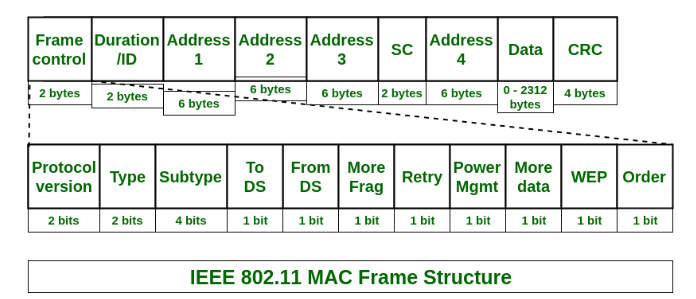
WiFi Frames
A packet is the smallest unit of data transmission; a wifi data unit is called a frame. The book is a little out of date, so we’ll refer to Geeks For Geeks to give us an overview:
A MAC frame has nine fields, with the Frame Control containing 11 fields.
The frame control has information about the type of frame, including the protocol version, whether it is management, control, or data, and whether the frames are in a sequence.
The duration states how long the frame will take to send, in microseconds.
The address fields hold the MAC addresses and rely on information contained in the ToDS and FromDS fields within the Frame Control. These route the frames to the correct places.
SC is used for frame sequencing, data holds additional info about a particular frame, and of course the CRC (Cyclic Redundancy Check) code which ensures the frame is correct.
https://www.geeksforgeeks.org/ieee-802-11-mac-frame
Management Frames
There are three types of frames: management, data, and control. Management is the most important as they are responsible for joining and leaving wireless networks.
A beacon lets devices around it know that a wireless network is available, and constantly sends out this signal.
A probe is a frame on your device that remembers network connections, and ‘probes’ for wifi connections.
When the device wants to connect, it needs authenticating, and the authentication frame is responsible for this. When a device leaves the network, a deauthentication frame is sent to terminate the connection.
Association frames agree on how they are going to communicate, and this includes encryption. A deassociation frame terminates the session.
SSID
A Service Set Identifier, also known as an SSID, is like a MAC address for a device – it is the name of the access point, and this is broadcast with the beacon so the device knows which signal to use to access the network. The BSSID stands for Basic Service Set Identifier, which is the MAC address of the access point.

An SSID is a string to identify a wireless access point.
p386
Vulnerabilities in Wireless Networks
The book explores how the CIA triad fits in with wireless networks:
Confidentiality – because wifi is open, confidentiality can be breached by obtaining information such as the data itself, the duration or payload of the communication, the type of transmission be it websites, email, or file transfer, and whether the session is encrypted. All of this information could be sensitive and for it to be intercepted can affect confidentiality.
Integrity – data can be modified or corrupted both maliciously and non-maliciously. Innocent integrity failures in wifi networks can involve the weather, distance, obstacles, and hardware and software failures. Malicious acts can consist of attackers attempting to alter the data transmitted, forging unencrypted data, or even take over the communication stream. A wifi connection will always prioritise a better signal, and if a weak signal is intercepted the attacker could take control using a more powerful device or stronger signal.
Availability – there are three potential problems that can affect wifi networks concerning availability: hardware failures, slow service due to obstacles or increased capacity, and the possibility of rogue network connection. This is when a private wifi network can be accessed by unknown connections, and free internet is acquired simply be finding an unsecure network or one offering DHCP (Dynamic Host Configuration Protocol) which can be abused by attackers. https://security.stackexchange.com/questions/189474/why-is-dhcp-considered-insecure
Sidebar 6-11 War driving
War driving is a term used to describe people driving around hunting for open wifi networks. This can be exploited by attackers hoping to join networks and sniff around. Additionally, joining a wifi network also has its risks: an attacker could sit in a public spot with an open wifi network and wait for people to connect, then use a network sniffer to check their traffic. Although most sites use encryption to mask sensitive data, confidential information can still be obtained. War driving isn’t really a thing anymore, because mobile phones can use wifi data for brief periods instead of laptops which have longer lasting sessions and are more susceptible to attacks. War driving can be used for passive reconnaissance however, giving an attacker more information about a network. https://www.reddit.com/r/hacking/comments/10j6ksw/what_is_wardriving/
An interesting site that shows wifi hotspots all over the world can be seen here: https://wigle.net
Unlike intercepting data transmissions in public places, where the law is unclear, connecting to someone else’s wifi is an offence under the Computer Misuse Act 1990, and is known as ‘piggybacking’. Unless you are given explicit permission, you are essentially stealing someone else’s internet services.
Unauthorised WiFi Access
To access a wifi access point, there are three steps which all have potential threats:
- the AP sends out a beacon stating its availability which invites devices to connect
- the NIC on the device requests to authenticate, and the AP accepts
- the NIC then requests association, which the AP then processes and accepts
There are potential threats at any point in this process, detailed in the table below. Basically, the 802.11 protocol suite does not perform rigorous authentication, and any device is able to access a wifi network which only has basic settings enabled. Mitigation against these vulnerabilities is shown.
| Management Frame | Threat | Mitigation |
| beacon | available to anyone | enable stealth mode |
| authentication | open-system | approved devices only |
| association | automatically accepts |
Framing Frames: Bypassing Wi-Fi Encryption by Manipulating Transmit Queues
Understanding IEEE* 802.11 Authentication and Association
WiFi Protocol Weaknesses
The designers of 802.11 built in the WEP protocol, which is now flawed: as technology advanced, it became easier to crack. Encryption keys are short, and the same key is used for all transmissions; we now look deeper into how each frame is vulnerable.
Wired Equivalent Privacy (WEP): Definition & Risks
Picking Up The Beacon
There are two configurations in wifi networks in how a beacon operates. The first is open mode, which advertises itself to any device as an available network. The second, closed mode (aka stealth mode or SSID cloaking) waits until a device asks if that particular network is available by requesting a particular SSID: then the Access Point invites the device to connect. This is useful as then the wifi network is only available to those who know the name of the Access Point.
However, although the Access Point has increased its security measures, the devices wishing to connect are exposed. A user knowing the name of an SSID will constantly broadcast this information via their device, and crackers would be able to intercept this data to discover the name of the hidden SSID, and using that information to access the network.

In open mode an access point continually broadcasts its SSID; in closed mode a client continually broadcasts a request to connect to a given SSID from a given MAC address.
p390
SSID in All Frames
Even in closed mode, once a device is connected, each frame contains the SSID information. Packet sniffers can then discover the name of the Access Point – frequent changing of the SSID could decrease risk, but would be inconvenient to authorised users who have to keep remembered the new SSID.
An improvement on SSID information being included in frames is to have a single data value used between an access point and an individual device; if an attacker managed to intercept association data they would only have the data value used for that session. Later frames would use a different value, not revealing the AP SSID.
Authentication in Wireless Networks
Access Points can be configured to only accept connections from approved devices – if the MAC address is not on the authentication list, it is not coming in!
Changeable MAC Addresses
Hackers can change the MAC address of their device to match an approved device MAC, allowing them to ‘clone’ the authorised device to gain access to the network. This is called MAC spoofing. Changing the MAC address is a case of updating the entry the network card address table where the OS will look it up when needed.
An operating system can send any address as if it were the MAC address of a NIC.
p390
There can be valid reasons to change a device’s MAC address, for example for penetrating testing, installing new hardware on old systems, and avoiding expensive licensing fees.
Stealing the Association
If an attacker has already intercepted the frames to obtain the SSID, thereby foiling stealth mode, and spoofed a MAC address to get on the approved devices list, the next step is gaining association.
Preferred Associations
Promiscuous access points accept any association from any device, and are usually set up in public places like airports for convenience. However, these are not secure. Preferred associations are when a device frequently connects to a particular network; these are saved within the wireless interface software and automatically connects when it is in range.
This can be dangerous for when an SSID has a common name, for example ‘FreeWiFi’. If you have previously connected to a wifi network called ‘FreeWiFi’ your device will always be on the lookout for this SSID: if it finds it, it will automatically connect if it is listed as a preferred association. This can be dangerous as hackers can exploit this to gain access to devices.
Vulnerabilities in wifi networks are extensive, demonstrating that wifi networks are difficult to secure, even with preventative measures. Now we look at security protocols introduced to improve wifi security.
Failed Countermeasure: WEP (Wired Equivalent Privacy)
Wired Equivalent Privacy, or WEP, was developed at the same time as the 802.11 protocol in 1997. They realised they needed a way to secure data transmissions over wifi communications. It is called ‘Wired Equivalent’ because they wanted to ensure people knew it was just as secure as ethernet networks: cables and wires are tangible things that can be physically protected, and any damage or intercepted can be visible. This is not the case with wifi data, and so WEP was created to protect the network.
WEP used the RC4 (Rivest Cipher 4, or Ron’s Code) stream cipher for encryption, and the CRC-32 checksum for integrity. RC4 is now prohibited within TLS: https://datatracker.ietf.org/doc/rfc7465/
NB: The history of RC4 is very interesting, have a read: https://en.wikipedia.org/wiki/RC4
WEP, WPA, WPA2 and WPA3: Differences and explanation
A history of wireless connectivity standards can be viewed here: The Evolution of Wi-Fi Technology and Standards
There are two methods of authentication*: Open System and Shared Key.
Open System simply has a client request to join the network from the Access Point, and association can happen without devices being ‘authenticated’. The data is then secured in frames that are encrypted using WEP keys.
Shared Key uses a handshake called ‘challenge-response’. It involves four steps:
- Client sends authentication request to access point
- Access point replies with a plaintext ‘challenge-text’
- Client encrypts the challenge-text using the WEP key and returns it to the access point
- The Access Point then decrypts the challenge-text and if it matches the plaintext, the client is authenticated.
This same shared key is used to encrypt data frames.
What is ‘challenge-text’?
Definition: challenge-response authentication
Challenge-response are protocols that are initiated by a challenge-response authentication mechanism, or CRAM. If the response from the client passes the challenge, access is granted. There are two types, static and dynamic. CRAM-MD5 was a type of challenge-response used up until it was declared obsolete.
https://en.wikipedia.org/wiki/Wired_Equivalent_Privacy
WEP Security Weaknesses
- Weak Encryption Key – the key was limited to 64 bits due to the US Government imposing a restriction, and the IV takes up 24 of this bits, leaving 40 bits for security. Keys are manually input by users, resulting in simple pass phrases that are easy to crack.
- Static Key – the key is shared so the same value is used at both end points. Additionally, keys can be updated but are not due to convenience. This results in the same key being used for long durations, making the network more vulnerable.
- Weak Encryption Process – Brute-force attacks can crack 40-bit keys quickly, and the algorithm used to create this key, RC4, have flaws. Stream ciphers are weaker than block ciphers, and can be cracked with brute-force methods.
- Weak Encryption Algorithm
- Initialisation Vector Collisions
- Faulty Integrity Check
- No Authentication
Bottom Line: WEP Security is Unacceptable
Stronger Protocol Suite: WPA (WiFi Protected Access)
Strengths of WPA over WEP
Non-static Encryption Key
Authentication
Strong Encryption
Integrity Protection
Session Initiation
Attacks on WPA
Man-in-the-Middle
Incomplete Authentication
Exhaustive Key Search
Conclusion: WPA is Adequately Secure
6.4 Denial of Service
6.5 Distributed Denial of Service
6.6 Cryptography in Network Security
6.7 Firewalls
6.8 Intrusion Detection and Prevention Systems
6.9 Network Management
6.10 Conclusion
References