

Chapter 7: Databases
This chapter covers:
- database terms and concepts
- security requirements, referring to the CIA triad
- access control: sensitive data, disclosure, inference, and aggregation
- data mining and big data
DBMS
valuable assets
security concerns
terminology
security requirements
data mining – finding patterns in databases and a security risk
7.1 Introduction to Databases
Two types of database, but relational is more common so we focus on that.
Terminology:
database: collection of data organised by rules that the user can use to arrange the data. data items are stored in a file, but really a database is more of a concept and can be stored and viewed in different ways
database administrator: person who organises the data and access controls
DBMS: database management system, the front end used to interact with the database
record: a record in a database consists of fields, such as name, address, telephone number.
schema: logical structure of database
subschema: part of the database, restricting certain fields
attribute: the column header
relation: set of columns
query: commands that retrieve, modify, add, or delete
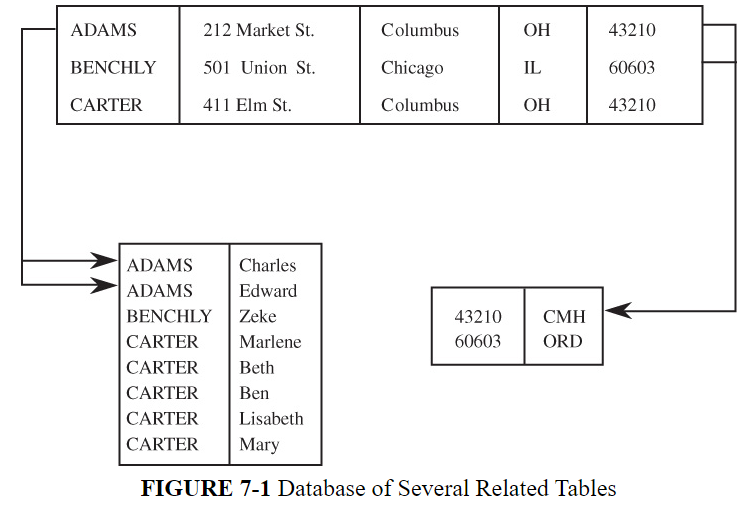
Advantages of Using Databases
A database is a single collection of data, stored and maintained at one central location, to which many people have access as needed.
p497
A database only shows the people that use it the information that is pertinent to them; fields may be hidden, and many databases may be linked together, but this is not important to the user.
Databases are better than file systems because they have:
- shared access = many users can access a single collection of data
- controlled access = data can only be viewed or modified by those authorised to do so
- minimal redundancy = users do not need to build or maintain their own databases
- data consistency = any changes are seen by all users
- data integrity = data is protected against accidental or malicious changes
DBMS, the front end by which the database is accessed, enables all of the above. Security measures can conflict with usability however due to computing power and storage increasing in line with security mechanisms.
7.2 Security Requirements of Databases
Requirements for database security:
- physical database integrity: survives power failures etc, can be easily reconstructed
- logical database integrity: the database structure is not affected by field modification
- element integrity: each field is accurate
- auditability: you can see who has made changes
- access control: users need to be authorised to view and/or edit the database or subschemas
- user authentication: users be authenticated to enable logging and modification
- availability: authorised users can always access the database
7.2.1 Database Integrity
The database must always be a trusted source of data – values must always be accurate. If the entire database is damaged, or elements are corrupted or illogical.
The DBMS, OS, and systems administrator is responsible for maintaining the integrity of the database.
The OS and sysadmin view the DBMS as a program, and the database as a file. To maintain integrity, files can be regularly backed up, which can then be restored if the database is damaged.
Sysadmins sometimes need to reconstruct a database should a system failure occur during active use, for example banking transactions or student registration. In this case, the DBMS’s transaction log comes in useful. Transactions do not need to be repeated by the users: instead the database is restored from backups, and the logs are used to reprocess the recent data. So even if the worst happens availability is still maintained without interruption.
The database elements, or fields, of a database always need to be correct and accurate to maintain integrity. Users can make mistakes when inputting new values: the DBMS has measures to ensure errors like this can be caught and fixed. This is done in three ways: field checks, access control, and the change log.
Field checks ensure the data input matches the value assigned to that element, for example, numerical, uppercase, or matching other information that is already stored, like a student ID or postcode (this would flag as ‘not a valid ID/postcode’). This prevents simple errors, such as the 1971 ‘black hole’ incident of ARPANET, where amending a table holding the routing information resulted in traffic being directed to a ‘black hole’ in the network. A DBMS could have prevented this by flagging the value as not a valid host, thereby preventing the loss of traffic.
Access control ensures only authorised users can view or modify the database. It also ensures data integrity. Without a database – a central repository for data – we would have three problems:
- data would not be consistent, one source may hold one old address, while another holds the updated value
- data may not be accurate: mistakes could have been made or data corrupted, and with so many sources, it would be difficult to correct them all
- lack of audibility: a person, upon noticing any errors, would not be able to update the information, or even be aware that these anomalies exist
Databases solve these problems by having all information in one source, and values are updated and corrected in one place.
Some questions remain however: who owns the database? Who is authorised to view and modify it? What happens if modifications conflict, or made out-of-sequence? How can this information be validated? The database manager is responsible for resolving these issues.
When software engineers configure computer systems, they include access controls and configuration settings. These are stored in a database called a CMDB (Configuration Management DataBase). There are three different ways to control versions and releases of the system:
- Separate files, ie V1, V2.
- Delta files which only store changes made.
- Conditional compilation.
Change logs list all changes made to a database, detailing both the updated and original value. This means that if mistakes are discovered, the correct value can be restored.
7.2.2 Audibility
Audibility ensures all access to the database is logged and recorded. This is beneficial for two reasons:
- maintains database integrity, and shows who has made changes and when
- users can access data incrementally: data is revealed sequentially, and the user’s access is tracked, meaning it keeps a record of elements shown. This also helps in deciding which information is shown to which user.
Granularity is the concept of which users can access what: for example, one user may be able to access only one row or column of a database. This is fine granularity: we can make it even more granular than this, with certain elements only available to certain users. This sort of detail is difficult to audit as it is so much information for the DBMS to store.
The DBMS can access a record for a user but not be able to see all the data within that record. This is called the pass-through problem. The log then shows the user accessed this record, but does not detail what information was relayed to the user. This can be a problem for information disclosure.
7.2.3 Access Control
Access controls dictate which users or programs have permissions to perform functions within a database: view, modify, or delete. Databases centralise data, therefore all data is held in one place, meaning access controls are important to restrict information being shown to unauthorised users.
It is the database administrator who is responsible for allowing access, and this can be done at the view, relation, field, or element level, depending on granularity. The DBMS needs to follow this policy, and depending on the size of the database and the number of users, this can be a complicated task.
Operating systems also use access control, but with databases it is much more complex. OS files and programs are unrelated objects, whereas records, fields, and elements are related. If a user has access to a file within a folder, it is unlikely they would be able to infer the contents of other files in a folder. This is not the case with databases where inference can be a problem: users are able to ascertain data in related elements even if they do not have access to them, as explored in our Inference exercises.
Inference happens because when users query a database it returns values relevant to that query. Depending on the structure and relations of that database, other values can be inferred. Users can essentially learn information from elements they do not have access to, by reading the elements they are authorised to access.
Inference can be difficult to control as any prohibitive statements affect the availability of the data: those who wish to simply look up values they have permission to view are then limited because of the chance of inference. Conditional statements control access for users, and prevent inference. However the computing power involved in processing this logic can affect performance.
It is easy to control access to a file within an Operating System: the choices are limited: access, read, write, etc. A database is much more complicated to control: each element within each field within each database must be considered. OS do not have access to the contents of a file whereas a DBMS does.
7.2.4 User Authentication
The DBMS performs its own authentication. This can be configured depending on the access controls: for example, a user may only be allowed to view a database if they enter the correct login details within a certain time period. This authentication is additional to the OS authentication: regardless of who is logged in to the OS, they must also log in to the database. DBMS do not trust OS profile authentication so it disregards the OS’s efforts.
7.2.5 Availability
DBMS perform as a program and a system. The DBMS is an application that manages many databases that are being accessed by many users all the time. Availability can be an issue when elements are being frequently modified, as this can prevent others from accessing those elements. The DBMS may also prevent a record being shown depending on access controls to stop a user seeing data from a protected data field. Both of these can result in frustrated users, and this will be examined later in the chapter.
7.2.6 Integrity/Confidentiality/Availability
Our old friend the CIA triad of Confidentiality, Integrity, and Availability is crucial to database management systems.
Integrity applies to all levels of the database: from elements to the database as a whole. The structure also has to maintain integrity: the relations between elements must remain correct and consistent.
Confidentiality, as we have seen, is also important. Only authorised users should be able to see information that is required for their role. Access can be direct (looking up a student record by name) or indirect (looking up average grades and seeing specific grades for a single student, or inferring this from the data). Direct access is easy to control, whereas indirect is not.
Availability of a database means that all users should be able to access the database as expected. Availability conflicts with confidentiality: restricted users may suffer loss of availability, or inference checks may result in slow performance.
7.3 Reliability and Integrity
A database can source data from several sources, meaning the DBMS needs to provide this information in a timely fashion, and can be relied upon. Reliability in software engineering means that software can run for long periods of time without failing – users input their data into a database, and regard this data as valuable company assets. This data must be protected from loss or damage.
A DBMS can protect data from being lost or damaged, but it is more difficult to guard against data being input incorrectly by an unauthorised user using the correct format.
- Database integrity ensures the database is protected from damage, ie, hardware failures or data corruption.
- Element integrity uses access controls to prevent unauthorised users modifying data.
- Element accuracy ensures that values are always correct: field checks and constraint conditions can ensure incorrect values are rejected or flagged.
7.3.1 Protection Features from the Operating System
The Operating System can protect databases by preventing files being accessed by unauthorised users. It also performs integrity checks, providing basic security. Database files should always be frequently backed up to ensure data can be restored.
7.3.2 Two-Phase Update
What happens if a computer goes down just as a user is updating the database? Only some of the data may have been written, some of it may be lost, but how can we check? DBMS use a process called the two-phase update to resolve this problem.
The two-phase update consists of two stages: the intent phase, and the committing phase.
The intent phase involves the DBMS preparing for an update: gathering the data, locking out other users, opening files etc. This can be repeated over and over but does not make any permanent changes. It does however save ‘shadow values’ which are stored locally.
The committing phase writes a ‘commit flag’ to the DB, meaning: make the permanent change using this data. The intent phase prior to this step is now finished, and cannot be repeated. The commitment phase however can repeat itself.
This gives the database two chances to save the data input by the user.
The one flaw in the two-phase update occurs after the transaction complete stage, but before the commit flag is removed, though these can be manually fixed by finding completed transactions with commit flags in the log.
7.3.3 Redundancy/Internal Consistency
DBMS provide mechanisms to ensure data is consistent. Different types of information can be stored to perform checks on the data, however the more mechanisms, the more memory, so performance can be affected.
Error detection and Correction Codes
Databases use parity bits, Hamming codes, and CRCs (Cyclic Redundancy Checks) to ensure data items are correct. These codes can be applied to fields, records, or the whole database. When a data item is input or retrieved, check codes are computed and stored. On subsequent accesses, the check code is compared with the previous code. If this doesn’t match, the DBMC flags it as an error.
Shadow Fields
Shadow fields, as we learned in the two-phase update, is when local values are stored in case of an incident when the changes cannot be saved permanently. These are always stored to ensure checks can be performed against the shadow fields and database entries. This can take up a lot of space as it is essentially duplicating the entire database.
Recovery
DBMS keep a log of user access and changes. In the case of an incident, the database can be restored from backup, and then changes adopted from the audit log.
7.3.4 Concurrency/Consistency
Database management systems serve multiple users at once by implementing concurrency and sequencing.
p509-510
Databases are systems that can be accessed by many users and must be able to support concurrency, where multiple tasks can be performed at the same time without interfering with others. If two users wish to view an element, it displays this without conflict. If two users wish to modify an element, this is where constraints must be put in place. If two booking agents are searching for seats on a flight and assign two passengers to one seat, this could cause a problem. However, a DBMS prevents this from happening by treating the entire operation as a single operation: once the agent has queried an empty seat, this empty seat is now not accessible to any other user until the agent has completed or cancelled their operation.
Another issue is when a user views an element while another user is updating it; this could result in incorrect information being relayed to the viewer. The DBMS prevents this by locking the field so it cannot be viewed until the update is complete or cancelled.
7.4 Database Disclosure
Computers have collected massive amounts of data containing sensitive information about individuals. Users can see data held in databases and make logical inferences about the information it holds. For example, you may be a member of a Music Club that means you like Music, however this may not be true. Here we examine how databases can disclose this information.
7.4.1 Sensitive Data
Some databases contain factual information that is not sensitive, for example books in a library catalogue. Others can contain highly sensitive information such as health or military data. Either one of these can easily be configured as the database can be considered as either wholly sensitive, or not sensitive, and access controls can be applied as appropriate.
However, some databases contain information that can be both sensitive and non-sensitive. A database can hold the name and number of a person which can be considered public domain: if it also held financial or healthcare data this would have to be protected. If a person has access to name and number, but is restricted in viewing the financial details but knows this attribute exists, this can be a problem. User access needs to be restricted so a person should only know the information they are entitled to.
Data can be labelled as:
- inherently sensitive, eg top secret information
- from a sensitive source, eg an informer who wishes to remain anonymous
- declared sensitive, when the database owner flags data as sensitive
- part of a sensitive attribute or record, the salary attribute for an employee
- sensitive in relation to previously disclosed information, the longitude of a secret location, for example, when the latitude is already known
7.4.2 Types of Disclosures
The CWE website (Common Weakness Enumeration), lists all weaknesses that become vulnerabilities across all software and hardware and is worth a look! https://cwe.mitre.org/index.html
Descriptive information about data can be a form of disclosure, as it supplies a context for the data that may be meaningless without it. Here we detail different types of disclosure and vulnerabilities:
- Exact data – either the users knows they are viewing sensitive data, or it has been revealed as part of another record
- Bounds – knowing that a data value will be between two values, thereby narrowing down the field, or it is outside the bounds, displaying perhaps instances of discrimination or favouritism
- Negative result – if a query of a database reveals 0 amounts of people who do not have a criminal record, the user will then know every person in that database has a criminal record.
- Existence – say there is an attribute in a database that a user knows is there, for example, a record of someone’s personal browsing history could reveal their internet use is being monitored
- Probable value – if a database shows there are 10 people living on a street, and querying how many of those voted for a certain political party which returned 5, this would reveal half of the street’s voting preferences.
- Inference (including direct attack, inference by arithmetic using SUM and COUNT, mean and median)
- Tracker attacks – if a small number of results output as a result of a query, the DBMS can conceal this data, however, by using additional queries and conditional statements, the DBMS is tricked into revealing the sensitive data.
- Linear system vulnerability
- Aggregation – the term aggregation refers to combining data from multiple records (rows). SQL provides many aggregation functions. In the context of data disclosure these can be used for inference.
- This paper looks at protecting ‘aggregated data’.
- Securing databases: https://apps.dtic.mil/sti/tr/pdf/AD1009288.pdf
- CWE-732: Incorrect Permission Assignment for Critical Resource
- Data analysis
- Metadata, including:
- Hidden data attributes – The AOL search log release incident is a good example of how personal identifiable data can be discovered from databases.
- File tags – metadata that includes personal identifiable information (PII)
- Geotagging – used by software to record where a photograph was taken, and stored in the metadata
- Tracking devices, eg phones
7.4.3 Preventing Disclosure: Data Suppression and Modification
Inference and aggregation problems are difficult to solve, especially when dealing with aggregated data which have many access controls, owners, and sources. The below methods are used to control these problems:
- Suppress obviously sensitive information – take a view to hiding any revealing data, even though it can affect usability
- Track what the user knows – a costly approach, all information must be logged for every user and every query, and cannot control what people already know or those who use multiple accounts
- Disguise the data – replacing names with IDs, rounding figures, or using codes, can work to prevent disclosure, however this affects the accuracy of the data. Synthetic data can be used in databases which reflect real data but does not hold any PII, eg Using synthesised data to prevent disclosures: Synthetic data generation for tabular health records: A systematic review.
Knowing that inference exists is the first step: you can then take measures to control it. Access controls can be applied to queries, or to individual items, but again, with so much data, users, and queries, it can be difficult to control every single scenario.
- Suppression is where sensitive data is not revealed at all, resulting in correct results but limited availability.
- Concealing shows an approximate result, but not the exact value, resulting in more availability but less accurate results.
7.4.4 Security Versus Precision
Precision is where we reveal as much non-sensitive data as we can to authorised users, without compromising security in disclosing sensitive data.
The figure below shows the relationship between security and precision:

Statistical Suppression
Limited Response Suppression
Combined Results
Random Sample
Concealment
Blocking Small Sample Sizes
Random Data Perturbation
Swapping
Query Analysis
7.5 Data mining and Big data
7.5.1 Data Mining
Data mining
Privacy and Sensitivity
Data correctness and Integrity
Correcting mistakes in Data
Using comparable data
eliminating false matches
Availability of data
7.5.2 Big Data
A Big Data Application Framework: Apache Hadoop
Privacy
Privacy-preserving Analytics
Granular access control
Security
Secure Data Storage
Transaction Logs and Auditing
Real-time Security Monitoring
Integrity
Data Accuracy
Source Provenance
End-point filtering and Validation
Security Additions for Big Data Applications
7.6 Conclusion
Other Resources
- This paper looks at protecting ‘aggregated data’.
- Securing databases: https://apps.dtic.mil/sti/tr/pdf/AD1009288.pdf
- CWE-732: Incorrect Permission Assignment for Critical Resource
- Using synthesised data to prevent disclosures: Synthetic data generation for tabular health records: A systematic review